Follow us

Search
For health professionalsContact usPress Enter to search. For products, try the shop filter.
 (08) 6110 0570
 admin@pdchealthhub.com.au
Press Enter to search. For products, try the shop filter.
(08) 6110 0570admin@pdchealthhub.com.auTubed or tubeless, automated or manual, phone or handset. Compare the pumps available in Australia, see how they are funded, and answer five quick questions to find the ones worth talking through with a credentialled diabetes educator.
An insulin pump is a small device that delivers rapid-acting insulin through a fine cannula under the skin, day and night. It gives a steady background dose and the extra doses you ask for at meals. Paired with a compatible CGM, most current pumps can also adjust insulin for you, which is called automated insulin delivery or a hybrid closed loop. You still tell the pump about your meals.
PHOTO NEEDED · Adult client clipping a tubed insulin pump to a waistband while talking with a credentialled diabetes educator, both faces visible, clinic setting. Landscape 4:3.
PHOTO NEEDED · A tubed pump and a tubeless pod side by side on a clinic desk with an infusion set, no faces. Landscape 4:3.
A tubed pump sits on your belt or in a pocket and connects to an infusion set by thin tubing. A tubeless pump is a pod stuck to the skin and controlled by a handset or phone.
PHOTO NEEDED · Close-up of a phone showing an automated insulin delivery app beside a sensor on the upper arm, no face. Landscape 4:3.
The pump reads your CGM and adjusts insulin every few minutes, easing off as glucose falls and adding a little as it rises. You still give a dose for meals.
PHOTO NEEDED · Parent and child at a kitchen table, child wearing a pod on the upper arm, both faces visible, guardian consent. Landscape 4:3.
Pumps are mostly used by people living with type 1 diabetes, including young children. They suit people ready to count carbohydrates, check their data and wear a device every day.
Never seen a pump up close? Here is what the parts are, where the insulin goes, and what changes when a glucose sensor is paired with it.
Illustration, not to scale. The cannula sits in the fatty tissue just under your skin, not in a blood vessel.
A reservoir inside the pump holds a few days of rapid-acting insulin. There is no long-acting insulin anywhere in a pump. A tubed pump sits in a pocket or on a belt and connects to you by thin tubing. A tubeless pump is a pod that holds its own insulin and sticks straight onto the skin, with a handset or phone to control it.
A fine, flexible tube called a cannula sits just under the skin, usually on the tummy, upper buttock, thigh or upper arm. An applicator puts it in and the needle that guides it comes straight back out, so only the soft tube stays behind. You change the cannula, and on a pod the whole pod, every 2 to 3 days.
Instead of one long-acting injection, the pump gives tiny amounts of rapid-acting insulin continuously. This is the basal rate, and it can be set differently for different times of the day and night. At meals you tell the pump what you are eating and it gives a bolus on top.
Most current pumps pair with a compatible glucose sensor. The sensor sends its readings to the pump or its app, and the system eases the background insulin off when glucose is heading low and adds a little when it is heading high. This is automated insulin delivery, also called a hybrid closed loop. It is not fully automatic: you still enter your carbohydrates and answer the alerts.
Pumps differ, but they are built from the same handful of parts. These are the words you will hear at a pump start, and the ones on your NDSS consumables order form.
Hover a numbered marker on the picture, or choose a part underneath. The picture stays on the last part you looked at.
The motor, screen and settings. On a tubed pump, the only part you keep.
Everything that touches your skin is replaced every two to seven days. The pump itself stays with you, and is the part you learn to drive.
The Insulin Pump, different shapes, different sizes.
Holds the insulin inside the pump. How much depends on the model.
You fill yourself from a vial, Penfill or pen. The NDSS calls these reservoirs, and they are a subsidised consumable for people living with type 1 diabetes.
Drawn see-through, because it sits inside the casing. It loads in upright and the tubing screws onto its top.
Tubing, connectors, an adhesive patch and the cannula.
Tubing comes in different lengths, so it can run short under a shirt or long to a pocket. Changed with the reservoir every two to seven days.
Connects to the reservoir/cartidge, out of the pump, to the patch on the skin.
The only part that goes under the skin.
Usually soft plastic, placed with a guide needle that is then withdrawn. Sometimes a fine steel needle that stays in, which suits people who react to the plastic.
The cut-away shows the skin surface, then the fatty layer the insulin goes into.
Not part of the pump, but what makes automated delivery possible.
The sensor sends readings to the pump or phone, which adjusts background insulin between your meal doses. Each pump works only with certain sensors, so the two choices are made together.
Worn on its own site. The curved lines are the wireless signal going back to the pump.
What you press to give a dose when the pump has no screen.
A pod has no screen, so a handset or a phone app drives it. Some tubed pumps also take a meal dose from a phone, with the pump itself as the backup.
Not worn. It lives in a pocket or a bag and talks to the pump wirelessly.
A replaceable battery, or a built-in rechargeable one.
Worth knowing which yours takes before you travel. A pump that runs on AA or AAA cells can be fixed almost anywhere; a rechargeable one needs its lead.
Tubed pumps only. A pod is sealed, with its own battery inside, and is replaced whole.
Reservoir, pump and cannula in one unit stuck to the skin.
No tubing to disconnect and nothing to clip to a waistband. The whole pod is replaced every two to three days.
One sealed shell. The insulin, the pump and the cannula are all inside it, so there is nothing to load and nothing to connect.
Every pump and pump app looks a little different, but they all show the same four things. The numbers on this example screen match the notes beside it.
Example screen only. Your pump, app, colours and settings may look different.
The number and the arrow come from your glucose sensor, not from the pump. The pump shows them so you can see what it is responding to. Without a paired sensor, this part of the screen is blank and you enter a finger-prick reading instead.
Often called active insulin or insulin on board. It is the insulin from earlier doses that has not finished acting yet. The pump subtracts it before suggesting a correction, so you are less likely to stack one dose on top of another and go low.
A line or bar shows the basal insulin, and whether the system is running in automatic mode. In automatic mode you can watch it hold insulin back when glucose is falling and add extra when glucose is climbing.
This is where you enter the carbohydrates you are about to eat. The pump works the dose out from your settings and the insulin still working, shows you the number, and waits for you to approve it. Automatic modes still need this.
A pump gives you finer control than injections and takes a lot of the day to day work off you, but it comes with responsibilities that injections do not. Our credentialled diabetes educators go through these points with everyone considering a pump.
This is the single biggest difference from injections. A pump holds rapid-acting insulin only, so if the cannula kinks, the set lifts off, the tubing blocks or the pump fails, your insulin supply stops. Ketones can build up quickly from there. Everyone on a pump needs in-date insulin pens or syringes, a written backup plan and the confidence to use both.
The NDSS clinical guidance used by Australian diabetes teams treats glucose above 13 mmol/L for 2 hours or more as a pump high, even if you feel well, and asks for a ketone check if it stays up for 2 to 4 hours. If ketones are 0.6 mmol/L or above, change the cannula and reservoir or the whole pod, give the correction by pen rather than through the pump, and follow your sick day plan.
Leaving a cannula in longer raises the chance of a blockage, a lump or an infection, and insulin absorbs less reliably from a tired site. Rotate where you put it so your skin recovers, use clean dry skin, and change it earlier in the day rather than at bedtime so you can see that glucose is settling before you sleep.
A pump stays on nearly all the time, though a tubed pump can be disconnected briefly, for example to shower or swim. How long you can safely be off it depends on your insulin needs, and water resistance differs between pumps, so check your own device's instructions rather than assuming. Exercise usually needs the background insulin adjusted, which we can plan with you.
Tell staff you are wearing a pump before an MRI, CT scan, x-ray or heat treatment. Most pumps and pods have to come off and stay outside the scan room, and the rules differ between brands, so check your device's instructions and plan how you will be covered for insulin while it is off.
A pump is attached to you almost constantly. The tubing, the bulk under clothes, the alarms and how it feels to have something visible all take getting used to, and that is a reasonable thing to weigh up. Clips, bands, pouches and overpatches help. We would rather talk this through before you commit than after.
Call us to talk it through before you choose. We compare pumps and sensors against how you live, and we run pump starts, upgrades and troubleshooting.
Call (08) 6110 0570Answer five quick questions and the list of pumps below the questions filters to the ones that fit you, best match first. It is a starting point for a conversation with your diabetes team, not a prescription.
Question 1 of 5
A pod sticks straight to the skin. A tubed pump sits on your belt or in a pocket.
This is automated insulin delivery. It needs a compatible CGM.
Each pump automates insulin only with the sensors it is built for.
Phone dosing depends on the pump, the sensor and your phone model.
Minimum ages differ between pumps.
Automated insulin delivery works best when the pump and sensor are chosen together. Bring your sensor details to your consult and we will check the pairing, including any change to your phone or pods.
Starting with manual pump therapy is a reasonable choice. Most current pumps can move to automated insulin delivery later, so it is worth asking about that before you choose.
Nothing fits every answer. Try a different sensor or tubing answer, or book a consult and we will work through the options with you.
Based on Australian availability checked 17 September 2026. Minimum ages come from each manufacturer. Your diabetes team makes the final call on which pump suits you.
Every pump listed below. Answer the questions above to filter this list, or select a pump for the full details.
PHOTO NEEDED · Product photo goes in this pump's Pump Image field in the CMS. Transparent or white background, 1200px wide.

PHOTO NEEDED · Product photo goes in this pump's Pump Image field in the CMS. Transparent or white background, 1200px wide.
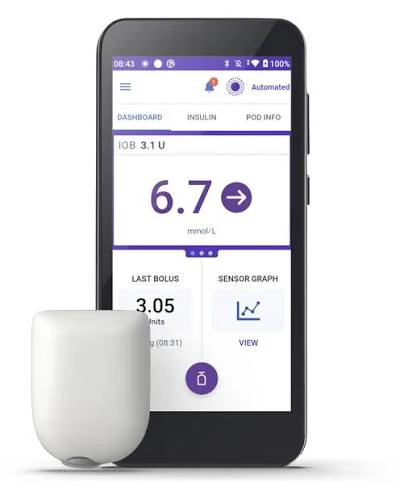
PHOTO NEEDED · Product photo goes in this pump's Pump Image field in the CMS. Transparent or white background, 1200px wide.

PHOTO NEEDED · Product photo goes in this pump's Pump Image field in the CMS. Transparent or white background, 1200px wide.
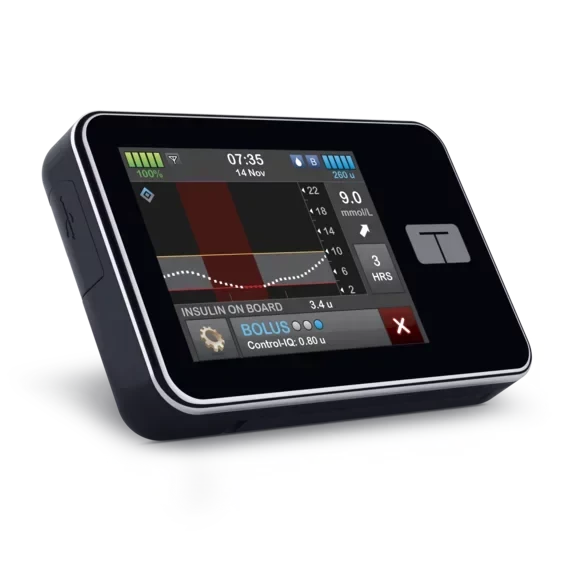
PHOTO NEEDED · Product photo goes in this pump's Pump Image field in the CMS. Transparent or white background, 1200px wide.
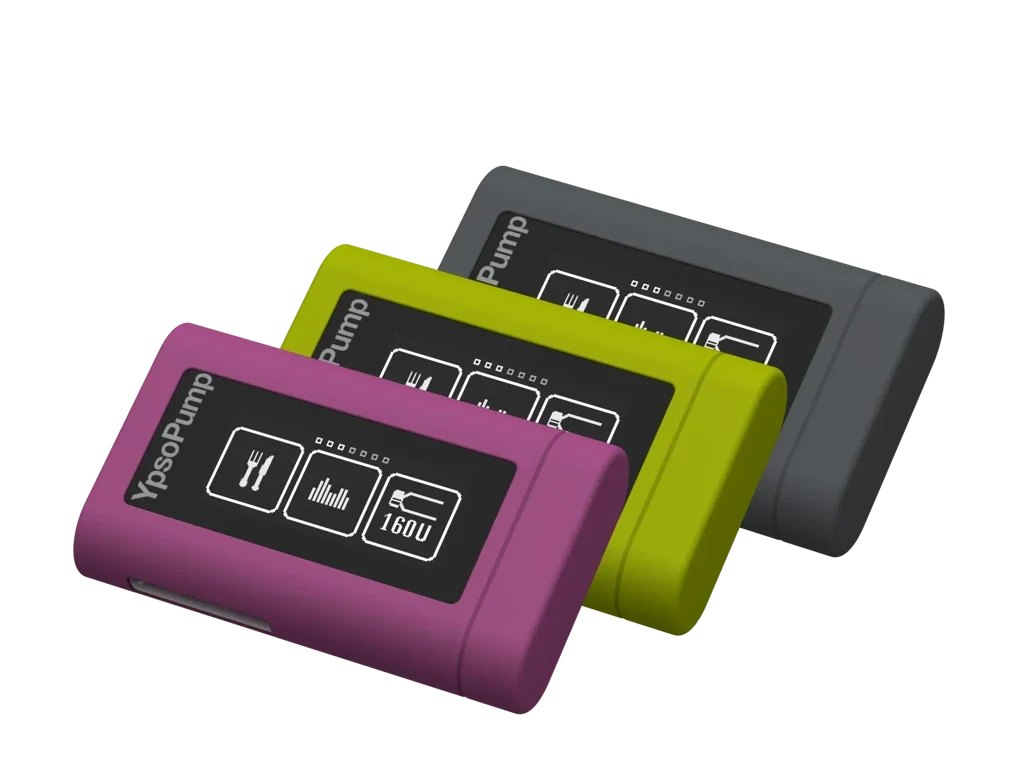
The pump and its supplies are funded separately. This is how it usually works in Australia.
Insulin pumps are covered by hospital cover when supplied as part of a hospital admission, and this is the most common way adults fund one. Gold hospital policies must include insulin pumps; check whether yours does. Expect a waiting period of up to 12 months for a pre-existing condition, and most insurers fund a replacement every four to five years.
A federally funded program that provides a mylife YpsoPump with CamAPS FX to eligible children and young people under 21 living with type 1 diabetes, whose family has no private cover for pumps and meets an income test. Diabetes Australia took over the program in August 2026. Applications are closed for now and are expected to reopen later in 2026.
Infusion sets, reservoirs and pods are subsidised through the NDSS for people living with type 1 diabetes who use a pump, and people with other types can apply for special consideration. An endocrinologist, credentialled diabetes educator, nurse practitioner or doctor who specialises in diabetes signs the form; GPs cannot. The pump itself is not an NDSS product.
You can buy a pump outright. Prices vary between models, so ask the distributor for a current quote before you decide.
If your warranty is ending or your pump is being discontinued, talk to us early. Insurers and the program have their own rules on replacements, and a new system usually means new consumables and sometimes a new sensor.
Call us and we will talk through the options for your situation.
Call (08) 6110 0570A pump start is a planned process over a few weeks, not a single visit.
We compare pumps and sensors against how you live, your insulin needs and how you will fund them.
We help with your insurer paperwork and your NDSS consumables form, and the distributor arranges your pump.
Hands-on training in filling, inserting, settings and alarms, then your pump goes on with starting settings agreed with your endocrinologist.
Frequent check-ins in the first weeks while your settings are fine-tuned, then regular reviews of your data.
What people usually ask before starting on a pump.
No. The NDSS subsidises pump consumables such as infusion sets, reservoirs and pods for eligible people, not the pump. The pump is usually funded through private hospital cover, the Insulin Pump Program for eligible under 21s, or bought outright.
No, but you need a compatible one for automated insulin delivery, which is how most people use a pump now. Choose the pump and sensor together, because each pump works only with certain sensors.
It depends on the pump. The Omnipod 5, t:slim X2 and mylife Loop apps can give meal doses from a compatible phone. The MiniMed 780G and Omnipod DASH are dosed from the pump or its handset. Phone support also depends on your phone model, so check before you choose.
Choosing a pump with your diabetes team, arranging funding and supplies, a training session on filling, inserting, settings and alarms, then close follow-up while your settings are adjusted. We run pump starts, upgrades and troubleshooting, and support people who started their pump elsewhere.
Yes. The mylife YpsoPump with CamAPS FX is approved from age 1 and the Omnipod 5 from age 2. Other pumps have higher minimum ages. We work alongside your child's paediatric diabetes team.
Switch to the backup plan your diabetes team gave you, usually pens or syringes, and call the manufacturer's support line, which is listed in your pump's paperwork and app. Always carry in-date backup insulin and supplies.
[1] NDSS. Insulin pump consumables. ndss.com.au, updated July 2026.
[2] Diabetes Australia. Insulin Pump Program. diabetesaustralia.com.au, updated August 2026.
[3] Commonwealth Ombudsman and privatehealth.gov.au. Private health insurance clinical categories: insulin pumps, 2026.
[4] NDSS. CGM device summary and compatibility chart, version 20, 1 July 2026, and NDSS product notices, 2026.
[5] Australian product information from Insulet, mylife Diabetes Care, AMSL Diabetes (Tandem) and MiniMed.
[6] NDSS. Insulin pumps. ndss.com.au, read 8 October 2026.
[7] ADEA and NDSS. Clinical guiding principles for sick day management of adults with type 1 and type 2 diabetes, version 4.1.0, June 2025.
General information only, checked 8 October 2026. It does not replace the instructions that come with your own pump, or the advice of your diabetes team. Pump availability, funding and compatibility change, so confirm with the distributor or your diabetes team. PDC Health Hub is not affiliated with any device manufacturer.
Book with one of our credentialled diabetes educators to compare pumps and sensors, work out funding and plan your start. Already on a pump? We help with upgrades, settings reviews and troubleshooting.
Or go straight to a service
Phone (08) 6110 0570 · Pump starts, upgrades and troubleshooting · Medicare, NDIS, DVA and private options across our services
For GPs, endocrinologists and nurse practitioners
Use our online referral form and tick Diabetes Education. Our credentialled diabetes educators can run pump training, complete NDSS consumables access and send a summary back to you.